Free Queue Simulator

Queue Simulator compare waiting time, queue length, and service capacity

Queue Simulator shows how arrivals, service windows, service time, variation, initial backlog, and customer abandonment change waiting lines over time.

Built for restaurants, banks, support desks, ticket windows, clinic front desks, and event entry queues.

Queue Simulator interactive model

Start Queue Simulator here: enter arrival speed, window count, average service time, service variation, duration, initial queue, and whether customers may leave.

Queue Simulator controls

Adjust demand, service capacity, customer behavior, and one optimization scenario. Queue Simulator updates the baseline and improved case instantly.

Demand

Service capacity

Customer behavior

Optimization scenario

Share this Queue Simulator result

Normal edits keep the clean page URL. Copy a result link only when you want to share the entered scenario.

Queue pressure level

Average wait

Max queue

Service completion rate

Window load

Window utilization
Idle time ratio

Queue Simulator timeline

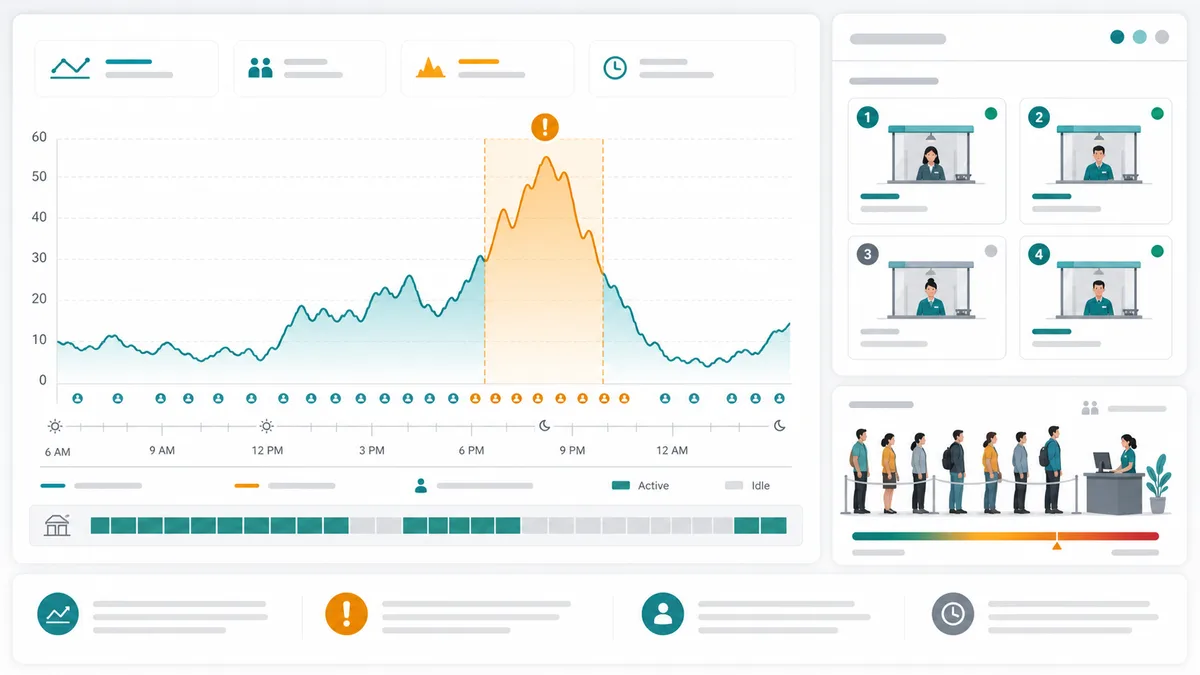
See how many customers are waiting, how many windows are busy, and where congestion peaks appear.

Waiting In service Congestion peak

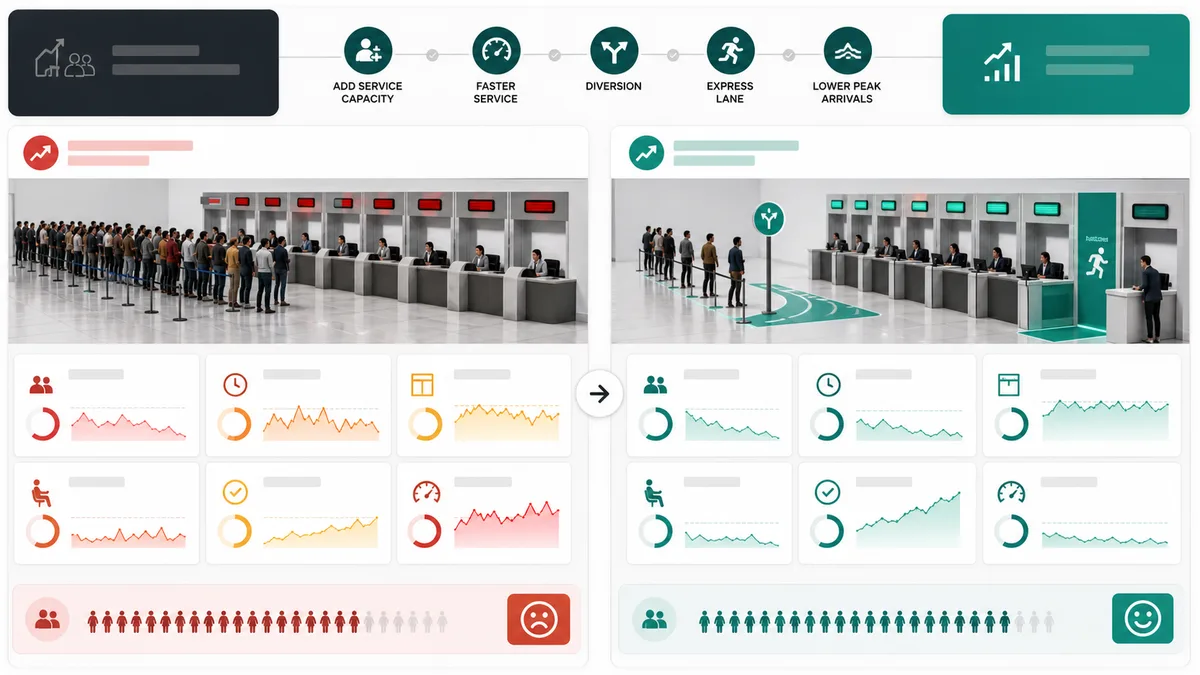
Queue Simulator before-and-after comparison

Compare the baseline queue against the selected improvement scenario.

Queue Simulator bottleneck and improvement advice

Queue Simulator is an educational operations model. It simplifies real traffic patterns, staffing rules, and customer behavior, so use it for comparison rather than exact forecasting.

Queue Simulator timeline workflow

Queue Simulator turns staffing and demand inputs into a time-based view of waiting pressure, busy windows, and congestion peaks.

Queue Simulator time axis

Queue Simulator displays waiting customers, active service windows, and congestion peaks at each moment of the simulated day.

Queue Simulator timeline chart showing waiting customers, busy service windows, and a congestion peak

Queue Simulator optimization comparison

Queue Simulator compares adding a window, shortening service time, diverting demand, creating an express lane, or reducing peak arrivals.

Queue Simulator before-and-after dashboard comparing waiting time, queue length, utilization, and completion rate

Queue Simulator quick guide

Use this Queue Simulator guide to test demand, service capacity, abandonment, and practical queue improvements.

01

Enter Queue Simulator demand

Set customer arrivals per hour, simulation duration, and the number of people already waiting.

  • Use higher arrival rates for lunch rushes, payday windows, or event opening times
  • Start with the real backlog if a line already exists
Open Queue Simulator
02

Set Queue Simulator service capacity

Choose how many windows are open, the average service time, and how much service time varies from customer to customer.

  • High variation often creates surprise peaks
  • Shortening service time can help as much as adding a window
View Queue Simulator features
03

Compare Queue Simulator improvements

Test capacity, speed, diversion, express lane, and peak-reduction options against the original queue.

Very high utilization is not always healthy. A tiny buffer can prevent sudden queue growth.

Explore more simulators

Queue Simulator features

Queue Simulator focuses on the decisions that change waiting lines: demand timing, window capacity, service speed, variation, and abandonment.

Queue Simulator arrivals

Model customer arrivals per hour with a rush-period wave and an initial queue already in place.

Set arrivals

Queue Simulator service windows

Change the number of open windows and see utilization, idle time, and waiting pressure update.

Adjust windows

Queue Simulator service variation

Add realistic service time variation so the timeline can reveal uneven waiting patterns.

Tune variation

Queue Simulator abandonment

Allow customers to leave when lines become too long, then watch completion rate change.

Test leaving

Queue Simulator optimization

Compare adding capacity, shortening service, diverting arrivals, express lanes, or reducing peak demand.

Compare options

Queue Simulator recommendations

Get a pressure level, bottleneck reason, utilization warning, and improvement advice.

Read advice

Queue Simulator use cases

Queue Simulator helps teams reason about service pressure before changing staffing, process design, or visitor flow.

Queue Simulator for restaurants

Estimate counter waits during lunch rushes and test whether one more cashier is worth it.

Model restaurant queues

Queue Simulator for banks

Compare teller staffing, appointment flow, and transaction service time in a branch.

Model bank queues

Queue Simulator for clinics

Plan front-desk intake lines, check-in kiosks, and fast-track lanes for short visits.

Model clinic queues

Queue Simulator for events

Test gate entry, ticket checks, and staggered arrival plans before doors open.

Model event queues

More life tools after Queue Simulator

After Queue Simulator, try related tools for planning capacity, costs, layouts, travel, and everyday decisions.

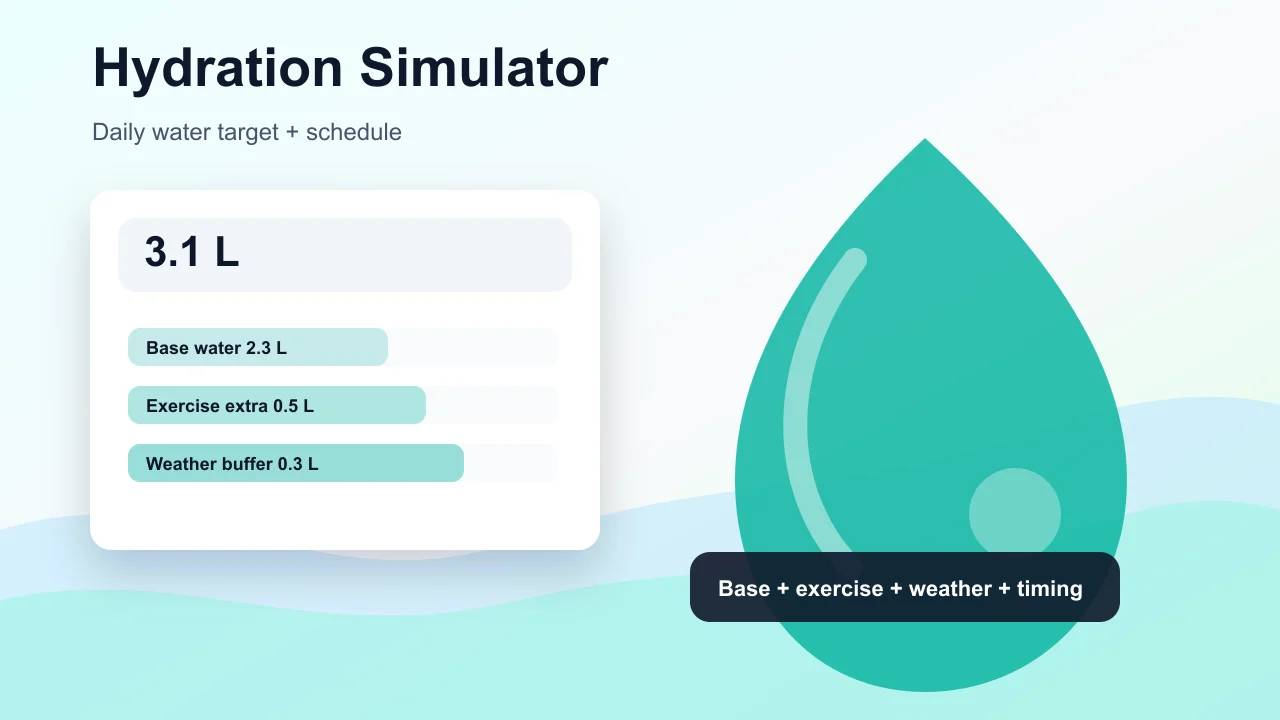
Hydration Simulator

Enter weight, age, temperature, workout time, sweat level, coffee, and alcohol to estimate daily water needs and a drinking schedule.

Hydration Simulator preview showing water intake controls, base water, exercise hydration, and a daily drinking schedule
Open tool

Pet Age Simulator

Choose a cat, dog, rabbit, or dog size, enter real age, and estimate human-equivalent age, life stage, and care tips.

Pet Age Simulator preview showing cat, dog, rabbit age conversion, life stage cards, and care advice
Open tool

Pregnancy Due Date Simulator

Enter a last menstrual period, conception date, ovulation date, or IVF transfer date to estimate due date, pregnancy week, trimester, and key prenatal milestones.

Pregnancy Due Date Simulator preview showing due date, pregnancy week, trimester timeline, and prenatal reminders
Open tool

Baby Growth Simulator

Enter baby age, sex, height, weight, and head circumference to estimate growth percentiles and track height and weight trends over time.

Baby Growth Simulator preview showing percentile cards, saved baby records, and height and weight trend lines
Open tool

Pizza Oven Simulator

Choose oven temperature, pizza thickness, toppings, and bake time to get crust score, doneness, and baking advice.

Pizza Oven Simulator preview showing oven controls, pizza crust score, doneness, and baking advice
Open tool

Room Layout Simulator

Plan a 2D room layout with dimensions, doors, windows, draggable furniture, clearance checks, layout scores, saved schemes, and exportable reports.

Room Layout Simulator preview showing a 2D floor plan, furniture blocks, door swing checks, window clearance, scores, and saved layout comparison
Open tool

Packing List Simulator

Generate a personalized travel checklist by days, weather, season, trip type, transport, lodging, kids, business, beach, camping, outdoor, formal, and electronics needs.

Packing List Simulator preview showing suitcase categories, documents, clothes, chargers, toiletries, medicine, beach gear, and outdoor gear
Open tool

Carbon Footprint Simulator

Estimate monthly or annual emissions from driving, flights, home energy, diet, shopping, online orders, household size, and region, then compare reduction actions.

Carbon Footprint Simulator preview showing transport, flights, home energy, diet, and shopping emissions breakdown
Open tool
View all simulators

Queue Simulator FAQ

Common questions about how Queue Simulator estimates waiting time, utilization, bottlenecks, and improvement scenarios.

How does Queue Simulator calculate waiting time?

Queue Simulator runs a minute-by-minute model. Customers arrive, wait in order, enter available service windows, and record waiting time when service begins.

Why can high utilization be risky in Queue Simulator?

When window utilization is near full capacity, there is little buffer. A small arrival spike or longer service time can make the line grow quickly.

Can Queue Simulator compare adding a service window?

Yes. Queue Simulator can compare the baseline against adding one window, faster service, diverted arrivals, an express lane, or reduced peak arrivals.

Does Queue Simulator support customers leaving the line?

Yes. When abandonment is enabled, customers may leave after long waits, which can reduce the visible line but lower the service completion rate.

What queue scenarios is Queue Simulator useful for?

Queue Simulator is useful for restaurants, banks, customer service desks, ticket windows, clinic front desks, and event entrances where arrival pressure and service capacity interact.

Try Queue Simulator now

Open Queue Simulator, change one input, and watch waiting time, queue length, utilization, and completion rate update instantly.

Use the comparison to decide whether the bottleneck is demand, service time, staffing, or peak arrival timing.

Free, browser-based, and designed for practical queue planning.