Article
Bed Slam vs Floor Slam Simulator: Which Meme Scene Builder Should You Use?
Compare Bed Slam Simulator and Floor Slam Simulator by scene style, camera angle, sharing needs, and the kind of joke you want to make.
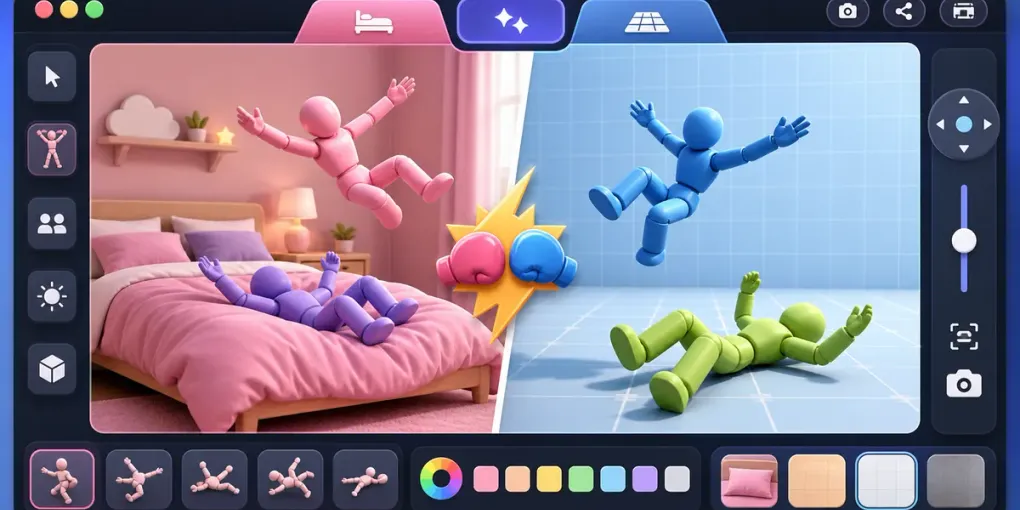
Bed Slam Simulator and Floor Slam Simulator are close relatives: both let you create a quick two-character meme scene in the browser, tune the people involved, and share the result. The difference is the kind of moment each one frames.
If you are deciding which one to use, start with the joke you want the viewer to understand in the first second.
Use Bed Slam Simulator for a Chaotic Room Scene
Bed Slam Simulator works best when you want a more staged, indoor, reaction-heavy result. The bed gives the scene a clear location, so the viewer understands the setup quickly. It feels like a screenshot from a slapstick moment or an exaggerated story scene.
Choose it when:
- You want a softer, room-based meme scene.
- The characters’ names or height difference are part of the joke.
- You want a screenshot that feels like a short story frame.
- You plan to share the result in a chat where people already know the context.
After setting the two characters, adjust height and color before the camera. Height difference can change how readable the scene is, and contrasting colors make the final image clearer.
Use Floor Slam Simulator for a Cleaner Action Pose
Floor Slam Simulator is better when you want the pose itself to be the whole joke. The floor setting has less visual noise, so the characters and body positions become the focus. It is usually easier to read as a simple meme image.
Choose it when:
- You want the cleanest possible action scene.
- You need the result to make sense without much context.
- You are making a reaction image rather than a story scene.
- You want the pose to stay readable on a small phone screen.
If the screenshot is going into a group chat or social post, Floor Slam often wins because the composition is simpler.
Settings That Matter in Both Tools
Both tools reward the same basic workflow:
- Set names only if they add meaning.
- Enter approximate heights if the size difference matters.
- Pick contrasting colors for the two characters.
- Try the camera angles before copying the link.
- Reopen the shared link once to confirm the scene saved correctly.
The most common mistake is tuning the characters but forgetting the camera. A good camera angle makes the result feel intentional; a bad one can hide the part of the pose that makes the joke work.
Which One Is Better for Sharing?
For private jokes, either tool works. Bed Slam is good when the recipient already knows the story. Floor Slam is stronger when the image needs to explain itself.
For public sharing, choose the version with the clearest silhouette. The viewer may only glance at it for a second, so the scene should not require a caption to become understandable.
If you want something warmer instead of meme-chaotic, use the Hug Simulator. If you want a more gaming-flavored joke, try Gamer Stop Simulator.
Quick Decision Guide
Choose Bed Slam Simulator if you want a room scene, a more staged setup, or a joke that depends on context.
Choose Floor Slam Simulator if you want a cleaner pose, a faster visual read, or a meme image that works even without explanation.
In both cases, keep the scene readable. Two distinct colors, a clear camera angle, and a simple setup will usually beat an overcomplicated scene.